

Hey there! As a supplier of network routers, I've seen firsthand how a well - adjusted antenna can make a world of difference in your Wi - Fi experience. In this blog, I'll share some tips on how to adjust the antenna of a network router for better signal.
Understanding Your Router's Antennas
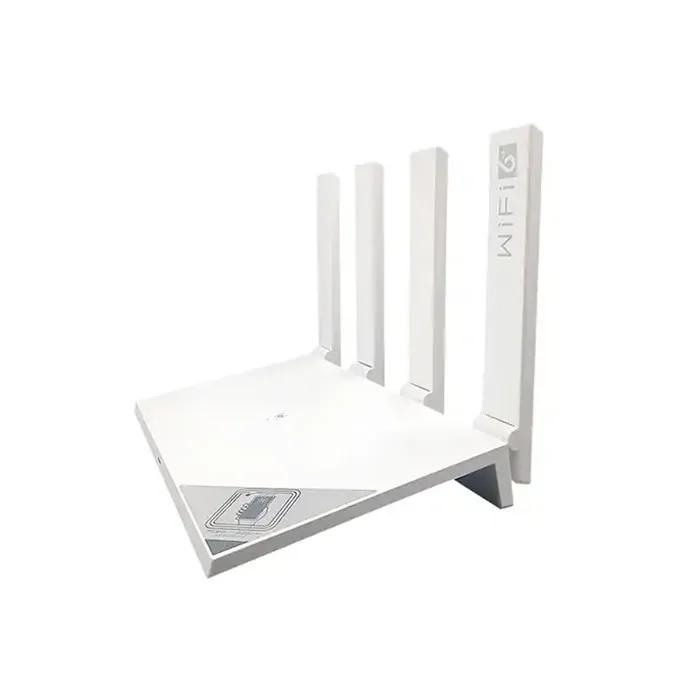
First things first, let's talk about the different types of antennas you might encounter. Most modern routers come with external antennas, which are great because they're adjustable. These antennas work by sending and receiving radio waves to create a Wi - Fi signal.
There are two main types of antennas: omnidirectional and directional. Omnidirectional antennas send out the signal in all directions, kind of like a 360 - degree circle. They're great for providing a wide - spread signal in a general area, like an open - plan living room. On the other hand, directional antennas focus the signal in a specific direction. They're useful when you want to target a particular area, say, a room on the other side of a thick wall.

Basic Adjustment Techniques
Now, let's get into the nitty - gritty of adjusting those antennas.
Vertical and Horizontal Placement
The most basic adjustment is to position the antennas vertically or horizontally. For an omnidirectional antenna, keeping it vertical is usually the best bet. This allows the signal to spread out evenly in all directions on the horizontal plane. If you have multiple antennas, try to keep them parallel to each other.
However, if you're dealing with a multi - story building or a large area with different levels, you might want to experiment with horizontal placement. For example, if you have a router on the first floor and want to improve the signal on the second floor, angling one antenna horizontally can help direct the signal upwards.
Angling the Antennas
Angling the antennas can also have a big impact on the signal strength. If you have a room that's far away from the router, try angling an antenna towards that room. This can help focus the signal and improve the connection in that area.
Let's say you have a home office at the end of a long hallway. By angling one of the router's antennas towards the office, you can boost the signal strength in that room. It's like shining a flashlight in the direction you want to see better.
Consider the Router's Location
The location of your router is just as important as the antenna adjustment. A router placed in a central location in your home or office will generally provide a better signal. Avoid placing the router in a corner or behind large metal objects, as these can block the Wi - Fi signal.
Also, keep the router away from other electronic devices that might cause interference, such as microwaves or cordless phones. These devices operate on similar frequencies and can disrupt the Wi - Fi signal.
Different Router Models and Antenna Adjustment
Not all routers are created equal, and different models might require different antenna adjustment techniques.
For example, the Huawei Wifi Router is known for its advanced antenna technology. It often comes with multiple antennas that can be adjusted independently. You can experiment with different combinations of vertical, horizontal, and angled placements to find the best signal for your specific needs.
The Xiaomi Wifi Router also has a user - friendly design when it comes to antenna adjustment. Its antennas are easy to move and can be optimized based on the layout of your space.
And the E Wifi Router offers a good balance between signal strength and adjustability. You can fine - tune the antennas to get the most out of your Wi - Fi coverage.
Troubleshooting Signal Issues
Even after adjusting the antennas, you might still encounter signal issues. Here are some common problems and how to fix them.
Weak Signal in a Specific Area
If you have a weak signal in a particular room, it could be due to the distance from the router or interference. Try moving the router closer to that room or using a Wi - Fi extender. You can also adjust the antennas to focus the signal in that direction.
Interference from Other Networks
If you live in an apartment complex or a crowded area, there might be a lot of other Wi - Fi networks in the vicinity. This can cause interference and weaken your signal. You can change the channel on your router to a less congested one. Most routers have a built - in feature that can scan for the best channel.
Final Thoughts and Call to Action
Adjusting the antenna of your network router is a simple yet effective way to improve your Wi - Fi signal. By understanding the different types of antennas, using basic adjustment techniques, considering the router's location, and troubleshooting common issues, you can enjoy a stronger and more reliable Wi - Fi connection.
If you're in the market for a new network router or need some advice on antenna adjustment, we're here to help. We offer a wide range of high - quality routers that are designed to provide excellent signal strength and coverage. Contact us to discuss your specific needs and let's find the perfect router for you.
References
- Network Router Basics: A Guide to Antenna Technology
- Wi - Fi Signal Optimization: Best Practices for Home and Office