


Network Router
-
![E Wifi Router]() E Wifi RouterIn today's digital age, high-speed and stable wireless network connections are crucial for both home and office environments. As the latest generation wireless network standard, e wifi router has...read more
-
![Xiaomi Wifi Router]() Xiaomi Wifi RouterXiaomi wifi router AX3000 is an alternative model of AX1800. The CPU adopts Qualcomm IPQ5000, dual-core 1GHz, integrated 1GHz NPU, the CPU integrates 256MB memory, integrated 2x2mimo Wi-Fi 6 2.4G,...read more
-
![Huawei Wifi Router]() Huawei Wifi RouterHuawei wifi router AX3 Pro is a Gigabit router with powerful performance, rich functions, good heat dissipation, and easy management. Although it is more expensive and takes up more space, its...read more
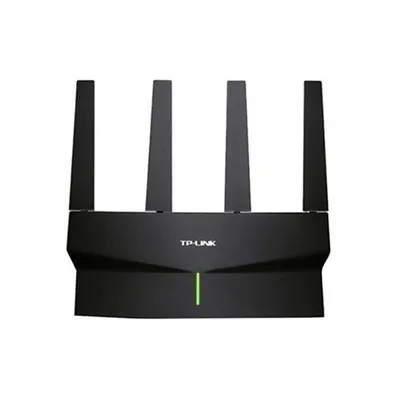


What Is Network Router?
A network router is a device that forwards data packets between computer networks. Routers perform the traffic directing functions on the Internet. A router is connected to two or more data lines from different networks. When a data packet comes in on one of the lines, the router reads the network address information in the packet to determine the ultimate destination.
A network router is a crucial device that plays a key role in directing network traffic efficiently. Essentially, a router is responsible for forwarding data packets between computer networks. Here's how a network router works.
Packet Forwarding: When data is sent over a network, it is broken down into smaller units called packets. Each packet contains information such as the source and destination IP addresses. The router examines this information to determine the best path for the packet to reach its destination.
Routing Table: Routers use a routing table to make decisions about where to send packets. This table contains information about various networks and the best paths to reach them. When a packet arrives at a router, it checks the destination IP address against its routing table to determine where to forward the packet.
Routing Protocols: Routers use routing protocols to communicate with other routers and exchange information about network topology and reachability. Popular routing protocols include RIP (Routing Information Protocol), OSPF (Open Shortest Path First), and BGP (Border Gateway Protocol).
Network Address Translation (NAT): Many routers also perform Network Address Translation, which allows multiple devices on a local network to share a single public IP address. NAT translates private IP addresses used within the local network into a single public IP address when communicating over the internet.
Firewall Functionality: Routers often include firewall capabilities to protect the network from unauthorized access and malicious attacks. Firewalls can filter incoming and outgoing traffic based on predefined security rules.
Quality of Service (QoS): Some routers support Quality of Service features, which prioritize certain types of traffic over others based on predefined rules. This ensures that critical data, such as voice or video calls, receive preferential treatment over less time-sensitive traffic.
Advantages of Network Router



Increased Speed and Efficiency: Routers are designed to manage and control network traffic. They can quickly and efficiently direct data packets to their intended destinations without any delay. This results in increased speed and efficiency of network communication.
Security: Routers have built-in security features that help to protect the network from external threats. For example, they can block unauthorized access attempts, such as hacking attempts, and prevent viruses and malware from entering the network.
Scalability: Routers are highly scalable as they can handle a large number of devices and networks simultaneously. As the network grows, routers can be upgraded or replaced as necessary to meet the increased demand.
Shared Resources: Routers allow multiple devices to share resources such as internet connections, printers, and other devices. This leads to increased productivity and cost savings for businesses.
Remote Access: Routers enable remote access to the network, which allows employees to work from anywhere in the world. This is especially important for businesses with employees in different locations.
Easy Management: Routers are easy to manage as they have user-friendly interfaces that can be accessed through a web browser. This means that network administrators can easily configure and monitor the network without any specialized knowledge.
Reliability: Routers are highly reliable as they have redundant power supplies and other features that ensure uninterrupted network service. This is critical for businesses that rely on network connectivity for their operations.
Revolutionize Your Internet: Upgrade Your Network Router
With the rapid advancement of technology and the increasing demand for high-speed internet connectivity, it has become essential to revolutionize your internet experience by upgrading your network router. A network router serves as the gateway between your devices and the internet, determining the speed, stability, and security of your online activities. By upgrading your router, you can unlock a world of possibilities and enhance your overall internet experience.
One of the key benefits of upgrading your network router is improved speed and performance. Newer routers are equipped with the latest technology, such as Wi-Fi 6, which offers faster speeds and better connectivity for multiple devices simultaneously. This means smoother streaming, faster downloads, and lag-free online gaming experiences. With more devices connected to the internet than ever before, a high-performance router is essential to ensure that all your devices can access the internet seamlessly.
In addition to speed and performance improvements, upgrading your network router can also enhance the security of your home network. Newer routers come with advanced security features such as built-in firewalls, WPA3 encryption, and automatic firmware updates to protect against cyber threats and unauthorized access. With the increasing number of cyber attacks targeting home networks, investing in a secure router is crucial to safeguarding your personal information and sensitive data.
Upgrading your network router can also improve the overall stability of your internet connection. Older routers may struggle to handle multiple devices or large amounts of data traffic, leading to dropped connections or slow speeds. By upgrading to a modern router with better processing power and advanced technology, you can enjoy a more stable and reliable internet connection for all your online activities.
Revolutionizing your internet experience by upgrading your network router is a wise investment that can bring significant benefits in terms of speed, security, and stability. With the increasing reliance on high-speed internet for work, entertainment, communication, and more, having a reliable and efficient network router is essential. So why wait? Upgrade your router today and unlock the full potential of your internet connection!

A network router is a device used to connect different networks and forward data packets between them. It serves as a gateway between the local network and the internet. Its primary functions include.
- Determining the best path for data packets to reach their destination.
- Maintaining routing tables that contain information about networks and routes.
- Filtering incoming and outgoing packets based on network protocols, IP addresses, and other criteria.
- Providing network address translation (NAT) to allow multiple devices to share a single public IP address.
- Implementing security measures such as firewalls to protect the network from external threats.
- Providing quality of service (QoS) to prioritize network traffic based on its importance.
- Monitoring network traffic to identify problems and optimize performance.
There are several types of network routers, including.
Wired routers: These routers connect to a network through a wired connection, such as Ethernet cables.
Wireless routers: These routers connect to a network wirelessly, using Wi-Fi.
Edge routers: These are high-performance routers that are used at the edge of a network, where the network connects to the internet.
Core routers: These routers are used in the core of a network and handle large amounts of traffic.
Virtual routers: These are software-based routers that are used in virtualized environments.
SOHO routers: These are small office/home office routers that are designed for use in small networks.
Enterprise routers: These routers are designed for use in large, enterprise-level networks.
Cloud routers: These are routers that are used in cloud computing environments to manage network traffic.

Say Goodbye to Dead Zones: Strengthen Your Network With a Router Upgrade
In today's digital age, a strong and reliable internet connection is essential for both work and leisure. Dead zones, or areas in your home or office where the Wi-Fi signal is weak or non-existent, can be a major source of frustration. However, with a simple router upgrade, you can say goodbye to dead zones and enjoy seamless connectivity throughout your space.
Upgrading your router can significantly improve the speed and range of your Wi-Fi network. Newer routers are equipped with the latest technology, such as multiple antennas, beamforming, and dual-band support, which can enhance signal strength and coverage. This means you can enjoy faster internet speeds and more stable connections in every corner of your home or office.
In addition to better performance, a router upgrade can also enhance security features to protect your network from potential threats. Many modern routers come with built-in security protocols, such as WPA3 encryption and guest network options, to safeguard your personal information and prevent unauthorized access.
When considering a router upgrade, it's important to choose a model that suits your specific needs and budget. Factors to consider include the size of your space, the number of devices connected to the network, and the internet speed provided by your service provider. Investing in a high-quality router may require a larger upfront cost, but the long-term benefits in terms of performance and reliability are well worth it.
Determine Your Internet Connection Type: Check with your internet service provider (ISP) to determine the type of internet connection you have: DSL, cable, fiber optic or satellite. This will help you determine the type of router you need.
Consider the Router's Speed: The speed of a router is measured in Mbps (megabits per second). Choose a router with a speed that is appropriate for the size of your household and the number of devices that will be connected.
Look for a Dual-band Router: A router with dual-band capability allows you to connect to both the 2.4 GHz and 5 GHz frequency bands. This can help reduce interference and improve the speed and reliability of your network.
Consider the Range of the Router: Make sure the router's coverage area is sufficient for your needs. Some routers come with external antennas, which can help extend the range.
Determine the Number of Ports Required: Consider the number of Ethernet ports you need to connect wired devices, such as desktop computers, gaming consoles or streaming devices.
Look for Advanced Features: Some routers come with advanced features, such as parental controls, VPN support, and Quality of Service (QoS) management. Determine which features are important to you.
Read User Reviews: Look for user reviews and ratings of the router you are considering. This can help you gauge its performance and reliability.
Consider the Price: Set a budget for your router and choose one that fits within your budget. Remember that a more expensive router may offer advanced features and better performance.

Networking has become an essential part of our daily lives, both personally and professionally. With the increasing number of devices that require an internet connection, having a quality network router is crucial to ensure a smooth and reliable connection. Investing in a high-quality network router can elevate your networking game in various ways.
First and foremost, a quality network router can provide faster and more stable internet connections. Whether you are working from home, streaming videos, or playing online games, a reliable internet connection is essential. A good router can help eliminate dead zones in your home or office and provide better coverage, ensuring that you have a strong and stable connection wherever you are.
A quality network router can offer advanced security features to protect your network from cyber threats. With the increasing number of cyber attacks targeting home networks, having a secure router is more important than ever. A good router can offer features such as firewall protection, VPN support, and parental controls to keep your network safe and secure.
Moreover, investing in a quality network router can future-proof your network infrastructure. As technology continues to evolve, having a router that can support the latest wireless standards and technologies is crucial. A good router can provide faster Wi-Fi speeds, better performance for multiple devices, and support for emerging technologies such as Internet of Things (IoT) devices.
Investing in a quality network router is essential for elevating your networking game. A good router can provide faster and more stable internet connections, advanced security features, and future-proofing for your network infrastructure. Whether you are working from home or simply enjoying online activities, having a reliable router can make a significant difference in your overall networking experience.
How to Maintain Network Router?
Maintaining a network router is essential to ensure smooth and secure operation of your network. Here are some key steps to help you maintain your network router effectively.
Regular Firmware Updates: Keep your router's firmware up to date by regularly checking for updates on the manufacturer's website. Firmware updates often include security patches and performance improvements.
Change Default Settings: Change the default login credentials (username and password) of your router to enhance security. Also, consider changing the default IP address range for added protection.
Enable Encryption: Enable WPA2 or WPA3 encryption on your router to secure your network from unauthorized access. Avoid using outdated encryption methods like WEP.
Change SSID: Change the default Service Set Identifier (SSID) of your network to a unique name that does not reveal any personal information.
Set Up Guest Network: If your router supports it, set up a separate guest network to isolate guest devices from your main network for added security.
Monitor Connected Devices: Regularly check the list of connected devices on your router's admin panel to ensure that only authorized devices are connected.
Enable Firewall: Enable the built-in firewall on your router to filter incoming and outgoing traffic, protecting your network from cyber threats.
Keep Router Cool: Ensure that your router is placed in a well-ventilated area to prevent overheating, which can affect performance and lifespan.
Regular Reboots: Rebooting your router periodically can help clear its memory and resolve any temporary issues that may be affecting performance.
Physical Maintenance: Keep your router clean by dusting it regularly with a soft, dry cloth. Avoid using harsh chemicals or liquids that may damage the device.
Application of Network Router
Connecting multiple devices: A network router allows multiple devices, such as computers, smartphones, and tablets, to connect to the internet effectively.
Filter traffic: Network routers can filter and manage internet traffic, allowing administrators to block unwanted or malicious content.
VPN connectivity: Virtual Private Networks provide secure and private communication between remote networks. Routers can provide VPN connectivity to remote offices or individual users.
Enhance Wi-Fi coverage: Routers equipped with wireless antennas can extend the coverage area of Wi-Fi connectivity in homes and offices.
Prioritize traffic: Network routers can prioritize traffic based on critical applications, ensuring that important data like voice and video calls receive the needed bandwidth.
Sharing resources: Network routers can allow multiple devices to share network resources like printers, hard drives, and scanners.
FAQ
Q: What is a network router?
Q: How does a router work?
Q: What are the types of routers?
Q: What is a wired router?
Q: What is a wireless router?
Q: What is a VPN router?
Q: What is a mesh router?
Q: What is a gaming router?
Q: What is a mobile router?
Q: How do I set up a router?
Q: How do I choose a router?
Q: What are some common router issues?
Q: What is router question answer?
Q: What does router do in a network quiz?
Q: What does router do in a network?
Q: How many networks does a router have?
Q: Does a router have Wi-Fi?
Q: Why do we need router?
Q: Does the router affect internet?
Q: Where does router work?
As one of the most professional network router manufacturers and suppliers in China, we're featured by quality products and competitive price. Please rest assured to buy cheap network router for sale here from our company. Contact us for customized service.