

Hey there! As a supplier of fiber ONUs, I've seen firsthand how these devices can revolutionize campus networks. In this blog post, I'll share some tips on how to use a fiber ONU in a campus network effectively.
Understanding Fiber ONUs
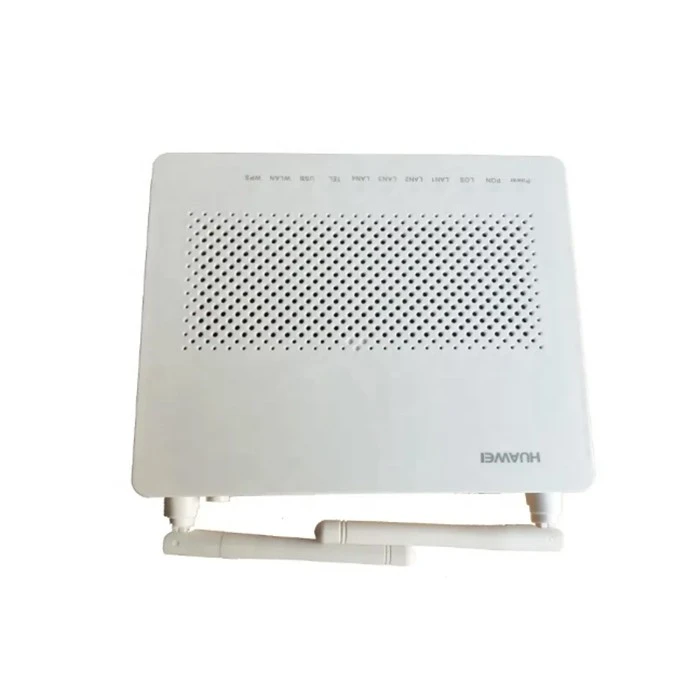
First things first, let's talk about what a fiber ONU is. An Optical Network Unit (ONU) is a device that connects to the fiber optic network and converts the optical signals into electrical signals that can be used by your devices. It's like a translator between the high - speed fiber network and your everyday devices such as computers, printers, and smart boards in a campus setting.
There are different types of fiber ONUs available in the market. For example, the 8546M Fiber ONU is a great option for medium - sized campus networks. It offers high - speed data transmission and reliable performance. The 8010H Fiber ONU is another popular choice, especially for larger campuses with more demanding network requirements. And if you're looking for a more general - purpose solution, the Fiber Optical ONT can be a solid pick.
Installation
Planning the Installation
Before you start installing the fiber ONU, you need to do some planning. Walk around the campus and identify the areas where you need high - speed internet access. This could be classrooms, libraries, administrative offices, and student lounges. Mark these areas on a map and determine the best locations to place the ONUs. You want to make sure that the ONUs are close enough to the devices that will be using them, but also in a safe and secure place.
Mounting the ONU
Once you've planned the installation, it's time to mount the ONU. Most fiber ONUs come with mounting brackets that allow you to attach them to a wall or a rack. Make sure to use the appropriate screws and tools for the mounting surface. You also need to ensure that the ONU is level and stable.
Connecting the Fiber
The next step is to connect the fiber optic cable to the ONU. This is a delicate process, so be careful. First, clean the fiber connectors using a fiber cleaning kit. Then, insert the fiber connector into the ONU's fiber port. Make sure it is properly seated and locked in place. You may need to use a fiber tester to check the connection and ensure that there are no signal losses.
Powering the ONU
After connecting the fiber, you need to power the ONU. Most ONUs can be powered using a standard power adapter. Plug the power adapter into a nearby electrical outlet and connect it to the ONU. Once the ONU is powered on, it will start initializing. This may take a few minutes.
Configuration
Basic Configuration
Once the ONU is powered on and connected to the fiber network, you need to configure it. You can do this using a web - based interface. Connect your computer to the ONU's Ethernet port using an Ethernet cable. Then, open a web browser and enter the ONU's IP address in the address bar. You'll be prompted to enter a username and password. The default username and password are usually provided in the ONU's user manual.
Setting Up the Network
After logging in, you can start setting up the network. You'll need to configure the ONU to connect to your campus's Local Area Network (LAN). This involves setting up the IP address, subnet mask, gateway, and DNS server. You can also configure the wireless settings if your ONU supports Wi - Fi. Set up the SSID (Wi - Fi network name) and the password.

Security Settings
Security is crucial in a campus network. You need to configure the ONU's security settings to protect your network from unauthorized access. Enable features such as firewall, MAC address filtering, and WPA2 - PSK encryption for Wi - Fi. This will help keep your network safe and secure.
Maintenance
Regular Checks
To ensure that the fiber ONU is working properly, you need to perform regular checks. Check the ONU's status lights to make sure that it is powered on and connected to the fiber network. You can also use network monitoring tools to check the network performance, such as bandwidth usage and latency.
Firmware Updates
Manufacturers often release firmware updates for their ONUs. These updates can improve the performance, add new features, and fix security vulnerabilities. Check the manufacturer's website regularly for firmware updates and install them as soon as they are available.
Cleaning
Over time, dust and debris can accumulate on the ONU. This can affect its performance and cause overheating. Use a soft, dry cloth to clean the ONU's exterior. If there is a lot of dust inside the ONU, you may need to use compressed air to blow it out.
Troubleshooting
No Power
If the ONU is not powered on, first check the power adapter and the electrical outlet. Make sure that the power adapter is properly plugged in and that the outlet is working. You can try plugging the power adapter into a different outlet to see if that solves the problem.
No Internet Connection
If the ONU is powered on but there is no internet connection, check the fiber connection. Make sure that the fiber cable is properly connected to the ONU and that there are no breaks or damages in the cable. You can also check the ONU's configuration settings to make sure that they are correct.
Slow Internet Speed
If the internet speed is slow, there could be several reasons. First, check the network usage. If there are too many devices connected to the ONU, it can slow down the network. You may need to upgrade the ONU or add more ONUs to the network. You can also check for any interference from other wireless devices.
Why Choose Our Fiber ONUs
We take pride in offering high - quality fiber ONUs. Our ONUs are designed to provide reliable and high - speed internet access. They are built with the latest technology and are tested rigorously to ensure their performance. We also offer excellent customer support. If you have any questions or need help with installation, configuration, or troubleshooting, our team of experts is always ready to assist you.
If you're interested in using our fiber ONUs in your campus network, we'd love to talk to you. Whether you're just starting to plan your network or looking to upgrade an existing one, we can provide you with the right solutions. Contact us today to start a discussion about your needs and how our fiber ONUs can meet them.
References
- Fiber Optic Association. (Year). Fiber Optic Installation and Maintenance Guide.
- ONU Manufacturer's User Manuals.