


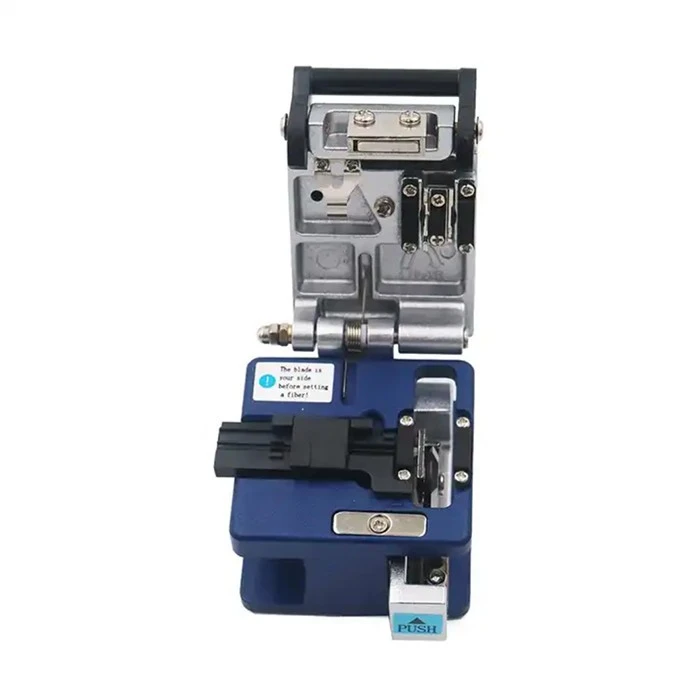
FC-6S fiber cleaver kit surface adjustment method
1. Please use a flat-blade screwdriver to loosen the screw fixing the blade.
2. Turn the blade to the next new cutting surface.
Use a cotton swab to press the side of the blade or push the tip out to make it easy to rotate the blade.
Notice:
(1) When changing the blade position (rotating blade), do not rotate the blade directly with your hands.
(2) Do not use metal tools (tweezers) to turn the blade.
(3) If metal tools are used, the blade will be damaged.
3. Tighten the blade fixing screw.
Note: Do not tighten the fixing screws with excessive force, as this may cause the screws to break.
4. Try to cut the optical fiber 1 or 2 times, and check the screen of the fusion splicer to confirm whether the optical fiber is cut or broken.
noodle. If the fiber cutting end face is not good, please adjust the height of the blade.
How to adjust the blade height of fiber cleaver kit
1. Please loosen the 2 fixing screws first.
2. Please loosen the screw that fixes the height of the blade.
3. Place the mechanical pencil lead or wooden thin rod flatly on the fiber optic holding clamp, and rotate the blade height adjustment screw while moving the blade slider back and forth. The height when the highest point of the blade mouth is in exact contact with the pencil lead or wooden thin rod is used as the reference point (0um).
Key points:
To increase the height of the blade, turn the adjusting screw clockwise.
To lower the blade height, turn the adjusting screw counterclockwise. (Use a cotton swab to press the blade downward while turning the blade height adjustment screw.)
When lowering the blade height, use a cotton swab to press down on the blade while turning the high-speed adjustment screw counterclockwise.
4. Please turn the blade height adjustment screw 4-6 steps clockwise from the reference point.
Note: Do not adjust the blade height too high. Otherwise, the pillow block will be damaged and the fiber section will be damaged.
5. Please tighten the blade height fixing screw. (appropriate force)
6. Please tighten the tool holder fixing screw. (appropriate force)
FC-6S high-precision fiber cleaver is a tool suitable for precision cutting of single-core optical fibers. This cleaver is suitable for both 250μm coated optical fibers and 900μm coated optical fibers. Cutting requires no special skills.

FAQ
Q: Why does the fiber coating need to be stripped off when cutting the fiber with a fiber cleaver kit?
The coating layer of the optical fiber is mainly to protect the fiber core, and peeling off the coating layer before using the fiber cleaver is to facilitate subsequent optical fiber splicing.
Fiber cleaver usage steps:
1. First use stripping pliers to remove the outer covering of the optical fiber;
2. Then use Miller pliers to peel off the coating layer on the fiber core;
3. Place the stripped optical fiber into the corresponding fixture of the fiber cleaver;
4. Press down the clamp and metal knife cover on the fiber cleaver to fix the fiber;
5. Push the slider on the cutting knife to cut the fiber core.
Q: Why fiber optic cutting knife cuts unevenly?
1. The blade is too high: the solution is to adjust and lower the height.
2. The upper and lower pressure pads do not match: the solution is to replace the pressure pad, adjust the position of the upper pressure plate, and the height of the magnet.
3. The slider swings or is not level: the solution is to adjust or replace it.
4. The blade holder is not perpendicular to the blade body: the solution is to clean and install and tighten the "knife holder" of the blade holder.
5. The rubber of the hammer is hardened or has foreign matter: the solution is to clean or replace it.
6. Blade aging: The measure is to replace the cutting end face of the blade or replace the blade.
Q: Why does the fiber cleaver always cut poorly?
There are four reasons why the optical fiber cutting knife keeps cutting:
1. The blade height is low;
2. The blade is dull;
3. There is a gap in the gasket and cannot hold the optical fiber;
4. The hammer is not strong enough.
There are reasons for the large angle:
1. The height of the blade is too high;
2. The blade is blunt;
3. The guide rail is biased;
4. The large shaft is loose.
If it is all caused by the height of the blade, just adjust the height directly. If there is a gap in the gasket, it depends on the model of the cutting knife. The shaft is loose or the guide rail needs to be repaired. It is recommended to use a better cutting knife, which is more stable, durable and easy to maintain.
Hot Tags: fiber cleaver kit, China fiber cleaver kit manufacturers, suppliers, Fiber Cleaver Kit, Optical Light Source and Power Meter


